Procreate Watercolour Calligraphy Brush: A Digital Inking Game-Changer
The Authenticity of Watercolour, Without the Mess
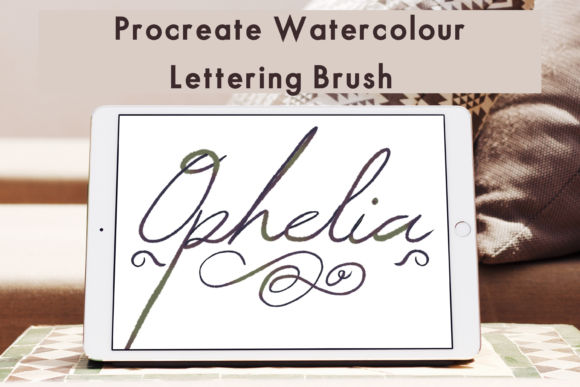
If you have ever tried to digitize traditional calligraphy, you know the struggle. Scanning watercolour brush strokes often results in flat images, grey shadows, and a loss of that vibrant, textured fluidity that makes the medium so special. Enter the Procreate Watercolour Calligraphy Brush. This tool bridges the gap between traditional lettering and digital efficiency. It is not just a static line; it is a dynamic typeface alternative that mimics the unpredictable beauty of pigment meeting wet paper.
What sets this script font alternative apart is its multi-tonal capability. Unlike standard vector brushes that offer a flat, solid color, this brush creates depth. It feels like actual ink charging and bleeding into the fibers of high-quality cotton paper. For the creative professional, this means you can achieve that coveted "hand-made" aesthetic directly on your iPad, saving hours of scanning and cleaning up artwork in Photoshop. The texture is rich, offering a tactile quality that flat digital assets simply cannot replicate.
Real-World Applications for Modern Creatives
Understanding where to use a premium font or brush like this is just as important as how to use it. The Procreate Watercolour Calligraphy Brush excels in projects where personality and warmth are paramount. It is a distinct departure from the cold precision of sans serif font families, making it ideal for specific contexts.
Branding and Logo Design
For entrepreneurs and small business owners, a logo is the face of the company. If your brand identity relies on organic, artisanal, or feminine qualities, this brush is a powerhouse. It works beautifully for boutique bakeries, wedding planners, lifestyle coaches, and cosmetic brands. When using this for logo design, the brush strokes provide an instant "signature" feel. It conveys authenticity and a personal touch, suggesting that there is a human behind the business who cares about details. However, remember that legibility is key; avoid overly complex swashes in the primary logo mark, saving those for secondary graphics.
Packaging and Editorial Design
In packaging design, shelf appeal is everything. The watercolour effect adds a layer of luxury and texture that pops on physical products. Imagine this brush used for the flavor names on a tea box or the header of a candle label. It pairs exceptionally well with clean serif font body text, creating a balanced visual hierarchy. Similarly, in editorial design—such as magazine headers or chapter openers—it breaks the monotony of standard typesetting, drawing the reader's eye immediately.
Digital Content and Social Media
The digital space is crowded. To stand out on platforms like Instagram or Pinterest, you need visuals that stop the scroll. The Procreate Watercolour Calligraphy Brush is perfect for social media graphics, particularly for quotes, announcements, and sale banners. Because it is pressure-sensitive, you can vary the stroke width to create emphasis on specific words, guiding the viewer’s reading order naturally. It adds a layer of artistic flair to web design hero sections or digital newsletters, making digital communication feel more intimate and less automated.
Technical Nuance: Pressure, Opacity, and Blending
What makes this specific brush a standout design asset is its responsiveness to the Apple Pencil. It is not a static stamp; it is a reactive tool. The pressure sensitivity allows for a natural transition between thick downstrokes and hairline upstrokes, which is the foundation of good calligraphy.
However, the real magic lies in the opacity and blend modes. By adjusting the opacity slider, you can simulate the look of watered-down ink or a dry brush effect. Furthermore, utilizing the blend modes within Procreate allows you to layer strokes. When one stroke crosses another, they don't just sit on top of each other; they interact. You can create a "wet-on-wet" effect where the colors merge, mimicking real watercolor behavior. This level of control elevates the work from simple lettering to modern typography art.
Integrating the Brush into Your Workflow
Adopting new creative font tools should streamline your process, not complicate it. Here is how to get the most out of this asset.
Installation and Setup
Before you begin, ensure you have the prerequisites: an iPad Pro, an Apple Pencil, and the Procreate App. The download process involves unzipping the file (using an app like iZip) and importing the brush set into Procreate. Once installed, you will find it in your library, ready to use. It is a good practice to create a dedicated folder for your favorite design assets so you can locate them quickly during a project.
Font Pairing Strategies
A beautiful handwritten font or brush needs a strong partner. Because the Procreate Watercolour Calligraphy Brush is ornate and textured, it requires a grounding element.
- With Serif Fonts: Pairing it with a classic serif (like a Garamond or Times variant) creates a traditional, editorial look. This is perfect for wedding invitations or high-end branding.
- With Sans Serif Fonts: For a more modern, clean aesthetic, pair the watercolour brush with a geometric sans serif. The contrast between the organic brush strokes and the rigid geometry creates a dynamic visual tension suitable for tech startups with a human touch or modern lifestyle blogs.
When testing pairings, pay attention to x-height and visual weight. You want the brush script to be the star, with the supporting text playing a secondary role.
Readability and Accessibility
While the brush is beautiful, it is distinctively expressive. In web design or long-form text, readability must come first. Avoid using this brush for body copy. Its strength lies in headers, pull quotes, and display text. If you are using it for a logo or a headline, zoom out and check if the word is legible at a glance. If a letter is too ambiguous due to the watercolour texture, simplify the word or increase the size. Good design is functional; even the most artistic display font must communicate clearly.
Evaluating Commercial Use and Licensing
For designers, marketers, and business owners, the utility of an asset is defined by its licensing. Most high-quality brushes like this come with a license that allows for commercial use, meaning you can use them in client work, merchandise, and products for sale. However, you cannot resell the brush file itself.
Always review the specific terms included with your download. When you use the Procreate Watercolour Calligraphy Brush to create a client's brand identity, you are delivering a unique piece of art. The brush is the tool; you are the architect. Ensuring you have the rights to use the tool commercially protects your business and your clients.
Final Thoughts on Texture and Tactility
In an era of flat design and vector perfection, there is a growing hunger for texture. Audiences crave the human element. The Procreate Watercolour Calligraphy Brush