Unleash Your iPad's Potential with This Procreate Brush Bundle
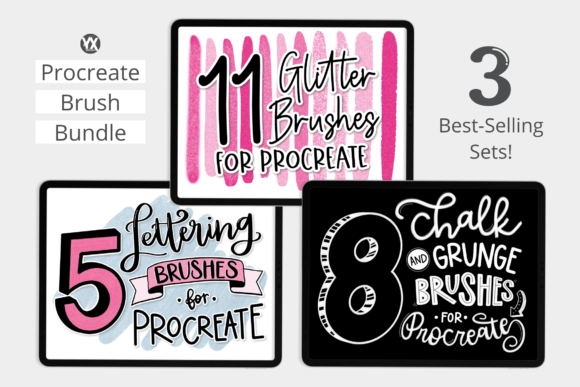
Every creative journey on the iPad begins with a tool, and for millions, that tool is Procreate. But the software itself is just the canvas. The real magic happens when you introduce a set of brushes that can transform your digital strokes into something with texture, personality, and depth. That's precisely where a curated Procreate Brush Bundle steps in. This isn't just a random collection of tools; it's a carefully selected trio of best-selling packs designed to cover the most sought-after styles in digital art today: shimmering glitter, gritty grunge, and elegant lettering.
Think of this bundle as a starter kit for your creative identity. It provides three distinct visual languages. The 11 Glitter Brushes are for adding a touch of glamour and celebration—perfect for festive social media graphics or eye-catching product mockups. The 8 Grunge/Chalk Brushes offer a raw, authentic, and tactile feel, ideal for vintage branding, textured backgrounds, or adding a handcrafted element to your designs. Finally, the 5 Lettering Brushes are your go-to for creating beautiful, flowing script for quotes, invitations, and custom logos. Each brush is engineered to respond to the pressure and tilt of your Apple Pencil, making the digital experience feel surprisingly natural and intuitive.
Where This Brush Bundle Truly Shines
The true value of a versatile Procreate Brush Bundle lies in its application across a wide spectrum of projects. For the entrepreneur or small business owner, these assets are invaluable. Imagine creating a series of Instagram Stories for a new product launch using the glitter brushes to highlight key features, or designing a rustic menu for a café using the chalk brushes. The consistency you can achieve by using the same core set of brushes helps build a recognizable brand identity without needing a massive design budget.
For content creators and bloggers, this bundle is a shortcut to more engaging visuals. Instead of relying on generic stock photos, you can create custom illustrations, design unique blog post headers, or produce standout social media graphics that truly reflect your personal style. A handwritten font style, created with the lettering brushes, can add a personal touch to a digital planner or a heartfelt thank-you note to customers. The grunge brushes can give a podcast cover art or a YouTube thumbnail an edgy, authentic look that cuts through the digital noise.
Even in more traditional design assets workflows, these brushes prove their worth. A graphic designer can use them to quickly mock up concepts for packaging design that requires a hand-drawn aesthetic. A publisher might use the lettering for chapter headings in a children's book or for a special edition cover design. The ability to easily change the brush color using the Procreate color tool means you can adapt these assets to any color palette, ensuring they integrate seamlessly into any project, whether it's for personal use or a commercial client.
Integrating Brushes into Your Creative Process
Adopting new tools requires a bit of strategy. The first step is simple: each brush set in this Procreate Brush Bundle will import directly into the Procreate app on your iPad iOS. Once installed, take a few minutes to experiment. Create a test canvas and just play. See how the glitter brushes sparkle at different opacities. Feel the texture of the chalk brush as you vary the pressure. Understand the flow of the script brush for lettering.
When starting a real project, consider the brush as part of your overall typography and visual hierarchy system. A glitter brush isn't just for filling in shapes; it can be used to create a stunning headline that demands attention. The grunge brushes are excellent for creating textured overlays that add depth to flat colors or photographs. Think about how these textures can influence the mood and perception of your design. A clean, modern layout paired with a gritty, chalk-drawn element creates a compelling contrast that feels both professional and human.
Don't be afraid to combine them. Use a lettering brush to write a word, then use one of the grunge brushes to add a distressed texture over the top for a vintage effect. Layer glitter on top of a solid shape to create a dazzling accent. The key is to see these brushes not as one-trick ponies, but as versatile components in your design assets toolkit. The options are truly endless, limited only by your imagination and the specific needs of your project, whether it's a web design mockup, a custom wedding invitation, or a bold piece of editorial design.
Choosing the Right Tool for the Job
While this bundle is incredibly versatile, the best results come from matching the tool to the task. Before you dive in, ask yourself a few questions. What is the primary emotion I want to convey? Is it elegance, rawness, or celebration? This will guide you toward the appropriate brush set. Who is the audience? A design for a corporate report will use these assets very differently than a poster for a music festival.
Evaluate the project's needs for readability. A heavily textured grunge brush might be perfect for a large, bold title but could become illegible in a small block of text. Similarly, a flowing script brush is beautiful for logos and headers but should be used sparingly for body copy. Always test your creations at the intended size and on different backgrounds to ensure clarity and impact.
Finally, think about font pairing and style consistency. If you're using the lettering brush to create a script headline, pair it with a clean sans serif font for supporting text to maintain balance. Use the grunge texture consistently across a series of graphics to build a cohesive look. This thoughtful approach elevates your work from simply using a filter to strategically employing a premium font style and texture system to build a stronger, more professional, and more engaging visual presence. This Procreate Brush Bundle