30 Neon Procreate Brushes: Create Realistic Glowing Art
There's something undeniably magnetic about neon. It cuts through darkness, demands attention, and carries a retro-futuristic vibe that works for everything from vintage diner aesthetics to cutting-edge digital branding. If you're a Procreate user, achieving that authentic, glowing tube effect often requires complex layering and blending. The 30 Neon Procreate Brushes kit simplifies this process entirely. This collection isn't just about drawing lines; it’s about injecting energy and light directly into your digital canvas with tools that mimic the physics of real neon.
Unlike standard digital brushes that simply lay down flat color, these tools are designed to simulate luminosity. When you use the Neon Procreate Brushes, you are working with assets that understand how light interacts with surfaces. Whether you are designing a logo for a nightclub, creating social media graphics for a tech startup, or simply journaling with a bit of flair, these brushes bridge the gap between digital drawing and realistic light effects. This kit provides a comprehensive solution, including not just the tools, but the environment and palette to make them pop.
Understanding the Anatomy of the Kit
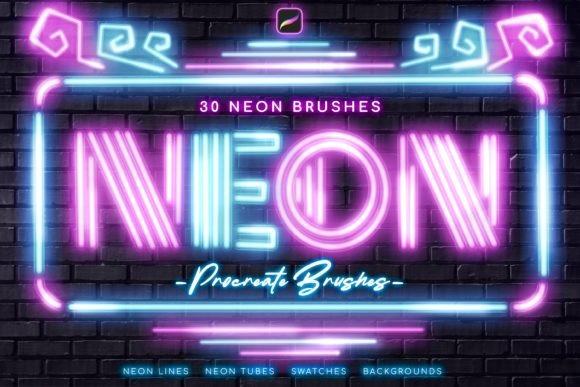
To get the most out of this collection, it helps to understand exactly what you are downloading. The kit includes 30 distinct Procreate brushes, but they are categorized by function to give you maximum control over your brand identity and artwork.
The core of the set lies in the variety of line weights and textures. You get 4 Tube Sizes, which allow you to create everything from delicate script lettering to bold, blocky headlines. These aren't just thicker versions of the same brush; they are calibrated to maintain the "glow" intensity regardless of size. Alongside these are 25 Neon Lines. These are versatile creative font alternatives—essentially brushes that act like stylus-driven light tubes. They are perfect for underlining text, creating borders, or drawing intricate illustrations.
For added texture and detail, the kit includes 4 Dot Brushes. These are excellent for stippling effects or creating starry backgrounds that complement your main neon subject. However, the standout tool is the Special Brush for Glowing. This specific brush is designed to add that final "halo" effect, making the light look like it is actually bleeding into the surrounding environment. Finally, the inclusion of a .swatches file with 14 Neon Colors ensures your palette is accurate—neon colors are notoriously difficult to get right, but these swatches provide the exact saturation and hue needed for realism.
Practical Applications: Where Neon Shines
While neon is a specific aesthetic, its applications in modern typography and graphic design are surprisingly broad. This kit is not limited to Halloween posters or cyberpunk fan art; it is a versatile design asset for professional and personal use.
Marketing and Social Media: In the crowded space of Instagram and TikTok, stopping the scroll is the primary goal. Neon effects are high-contrast and visually arresting. Use these brushes to highlight specific keywords in a quote graphic or to create a "sale" sign that looks physical rather than digital. The brick wall background included in the kit is a perfect backdrop for "announcement" style posts, giving your content an urban, street-style feel that resonates with younger demographics.
Digital Lettering and Typography: If you are a hand-letterer, these brushes simulate the experience of writing with a neon pen. The 5 Pen Pressure Sensitive Neon Brushes are particularly crucial here. They allow you to vary the brightness or thickness based on how hard you press, mimicking the way a real neon sign might flicker or intensify at the bends of a tube. This adds a layer of organic authenticity that static brushes cannot achieve.
Editorial Design and Publishing: For magazine covers or blog headers, neon can serve as a striking accent. It works exceptionally well as a display font replacement for headers. Imagine a dark, moody food photography spread where the recipe title is "written" in glowing pink or blue neon. It creates an immediate mood—modern, trendy, and slightly mysterious.
Integrating Neon into Your Brand Identity
Choosing a visual style is about more than just aesthetics; it’s about personality. Incorporating Neon Procreate Brushes into your visual strategy signals specific traits to your audience. It suggests energy, nightlife, technology, and a willingness to break away from corporate minimalism.
However, balance is key. If you are a small business owner or entrepreneur, you don't want to overwhelm your audience with visual noise. Use neon sparingly for high-impact moments. For example, in a packaging design for a product, a neon accent on a dark background can make the product feel premium and exclusive. In web design mockups created in Procreate, use neon to indicate interactive elements like buttons or calls to action.
The kit also helps maintain visual hierarchy. By using the larger tube brushes for the main message and the thinner line brushes for secondary information, you guide the viewer's eye exactly where you want it. Because the kit includes a brick wall background, you have a built-in context for testing your designs. Brick provides a textured, neutral ground that makes the neon colors pop, allowing you to see immediately if your color choices have enough contrast and "glow" to be effective.
Tips for Maximum Realism and Impact
To truly master the art of digital neon, you need to think about light physics. A neon tube is a light source, meaning it illuminates the area immediately surrounding it. When using the Special Brush for Glowing, layer it beneath your main neon line. This creates the diffusion effect where the light appears to spill over onto the brick wall or paper.
Color choice is also vital. While the kit includes 14 Neon Colors, don't be afraid to experiment with layering. Neon light often looks best when it is a pure, saturated color (like electric blue or hot pink) surrounded by a white or very light core. You can achieve this by using a white brush on a lower opacity first, then applying your neon color on top, and finally using the glow brush to add the colored aura.
Remember that these are premium font and brush assets designed specifically for the Apple iPad ecosystem. They are optimized for the Apple Pencil's pressure sensitivity, which is why the 5 Pen Pressure Sensitive Neon Brushes work so seamlessly. Ensure you are working on a canvas size that supports high resolution; neon effects rely on smooth gradients, and pixelation can break the illusion of light.
Whether you are a crafter looking to add flair to digital stickers, a marketer creating a campaign for a new tech product, or a designer exploring retro typography, this kit provides the tools to do it efficiently. It removes the technical barrier of creating light effects, allowing you to focus on the creative application.