Mastering Procreate Tattoo Brushes for Digital Ink
If you have ever wanted to bridge the gap between traditional tattoo flash sheets and digital art, you are likely already familiar with the power of Procreate on the iPad. However, the standard library of brushes often lacks the specific grit, texture, and flow required for authentic ink work. This is where specialized Procreate Tattoo Brushes come into play. These sets are designed specifically to mimic the behavior of a coil machine or a rotary pen, offering a tactile experience that standard digital pens simply cannot replicate.
Using these brushes changes the way you approach line weight and shading. Unlike standard smooth vectors, tattoo brushes have a natural "drag" and texture. They react to the pressure of your Apple Pencil, allowing you to create lines that taper organically or shade with a peppered effect that looks like real skin work. Whether you are a professional tattoo artist sketching out a sleeve for a client or a graphic designer looking to add an edgy, human touch to a logo design, these assets are an essential addition to your toolkit.
Visual Characteristics and Authentic Style
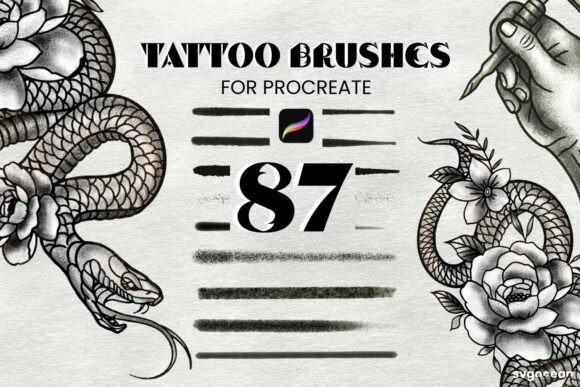
The appeal of high-quality Procreate Tattoo Brushes lies in their ability to simulate imperfection. In the world of modern typography and design, we often strive for pixel-perfect precision, but tattoo art thrives on character. These brushes usually include a variety of needle groupings—think tight liners for intricate details, magnum shaders for smooth gradient transitions, and specific texture brushes for effects like dotwork or stippling.
When you load a .brushset file, you are importing a curated collection of tools that have been fine-tuned for the iPad’s glass surface. The visual personality of these brushes is raw and bold. They allow you to create work that feels hand-drawn rather than computer-generated. This is particularly useful when working on brand identity projects for clients who want to appear rebellious, artisanal, or authentic. A standard sans serif font might feel too corporate, but a typeface or illustration created with tattoo brushes immediately signals a distinct, creative personality.
Practical Applications Beyond the Tattoo Studio
While these tools are obviously indispensable for tattoo artists preparing designs for clients, their utility extends far beyond the shop. For content creators, marketers, and designers, these brushes offer a way to break the mold of standard digital aesthetics.
Editorial and Packaging Design
Imagine you are designing a label for a craft brewery or a coffee roaster. You need artwork that feels handmade. Using Procreate Tattoo Brushes allows you to draw intricate illustrations that hold up in high-resolution print. The shading stamps are particularly useful here; they allow you to quickly fill large areas with consistent texture, saving hours of manual stippling. This creates a visual hierarchy that draws the eye and communicates quality craftsmanship.
Digital Branding and Social Media
In the fast-paced world of social media graphics, standing out is difficult when everyone uses the same stock assets. By incorporating hand-drawn elements created with tattoo brushes, you add a layer of authenticity that audiences connect with. Whether it is a custom icon for a podcast or a header image for a blog, the gritty texture of these brushes adds depth. They pair surprisingly well with clean serif fonts or script fonts, creating a contrast between elegance and raw energy.
Logo Design and Custom Lettering
If you are working on a logo design that requires a handwritten font style or custom lettering, these brushes are your best friend. They allow you to sketch ideas quickly with a "brush pen" feel that is responsive to pressure. This helps in the conceptual phase of editorial design or packaging design, where you need to show clients a concept that feels lived-in and real, not just a typed-out font file.
Evaluating Fit and Workflow Integration
When incorporating these assets into your workflow, it is important to evaluate how they fit with your existing design assets. You should view these brushes not just as drawing tools, but as part of a larger typographic and visual system.
One of the biggest advantages of the Procreate Tattoo Brushes format is the ease of use. Because they come as an Instant Download in a .brushset file, the installation is seamless. You simply download the file to your iPad, tap it, and it automatically imports into Procreate. There is no need to manually install individual files. This frictionless process means you can go from idea to execution in seconds.
When testing these brushes, pay attention to how they interact with different canvas sizes. Tattoo art often requires high DPI (dots per inch) settings to capture the fine details of the needle textures. Ensure your canvas is set to at least 300 DPI if you plan to print the work. This ensures that the "ink" remains sharp and doesn't pixelate when transferred to physical media like paper or sticker sheets.
Choosing the Right Set for Your Needs
Not all brush sets are created equal. When looking for a premium font or brush set, you want to ensure the creator understands the medium. A good set of Procreate Tattoo Brushes should include a variety of opacities and textures.
- Line Work: Look for brushes that offer a "pull" effect, similar to a real needle. They should be responsive to the tilt of your Apple Pencil for shading, but firm when pressing down for lines.
- Shading: The best sets include Tattoo Shading brushes that mimic whip shading or pepper shading. These are crucial for adding depth to your illustrations without using a standard airbrush, which can look too smooth and artificial.
- Stamps: Stamps Brushes are a massive time-saver. These are pre-made elements—like roses, daggers, filigree, or geometric patterns—that you can stamp onto the canvas. You can use these in any color or opacity, allowing you to build complex compositions quickly.
Remember that these tools are ONLY compatible with the Procreate App. They will not work in Photoshop, Illustrator, or other desktop software. This specificity is actually a benefit, as it means the brushes are optimized specifically for the iPad's hardware and the software's rendering engine, ensuring maximum performance and a natural feel.
Final Thoughts on Creative Execution
Ultimately, Procreate Tattoo Brushes are about expanding your creative vocabulary. They allow you to step outside the rigid grid of modern digital design and introduce an element of human touch. Whether you are a small business owner creating your own merchandise, a hobbyist practicing drawing, or a professional designer looking to diversify your style, these brushes offer a practical, high-value solution.
By understanding the nuances of line weight, texture, and shading, you can use these tools to create work that resonates with your audience. The ability to instantly download and import these assets means there is no barrier to entry. Open your iPad, load the brushes, and start experimenting. You might find that the "ink" flows better digitally than you ever imagined.