Mastering Light and Shadow: A Designer's Guide to Procreate Shading Brushes
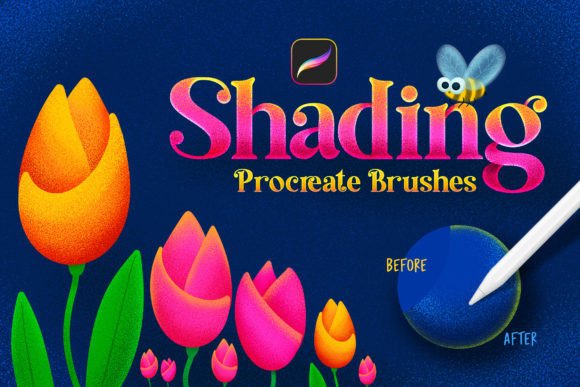
Every digital artist and designer understands that flat color rarely tells a complete story. Whether you are crafting a brand identity for a startup or creating social media graphics for a marketing campaign, depth is what captures attention. In the world of iPad illustration, achieving that realistic depth used to require complex layering and blending. However, specialized tools like the Shading Procreate Brushes set have changed the workflow entirely. This collection of 124 brushes is not just a standard set of tools; it is a specialized system designed to streamline the creation of shadows, highlights, and textured fills without interrupting your creative flow.
The Dual-Color Workflow: Speed Meets Precision
The defining feature of these design assets is the ability to draw two colored lines in a single stroke. For designers working on tight deadlines—such as packaging design or editorial design layouts—this feature is a game-changer. The system works by utilizing the main color for the outline while simultaneously applying a secondary color for the fill or shading effect. This eliminates the need to constantly switch palettes or manually apply gradients after the fact.
The visual result is a sophisticated, layered look that mimics the nuance of traditional mediums. You get the crispness of a vector path combined with the organic feel of ink or paint. The collection includes 25 specific Procreate brushes that are pen pressure sensitive. This sensitivity is crucial for creating natural-looking line weight variation. A light touch yields a delicate line, while heavier pressure creates bold strokes with rich, dual-tone shading. This adaptability makes the set versatile enough for both delicate lettering and bold, abstract backgrounds.
Visual Character and Stylistic Versatility
When evaluating a premium font or brush set, the "personality" of the tool dictates its application. The Shading Procreate Brushes set leans heavily into a style that is both modern and tactile. The collection features three distinct categories: classic outlines with empty fills, gradient outlines with empty fills, and the signature double-color brushes.
This variety allows for a wide range of modern typography and illustration styles. For instance, if you are working on a logo design that needs to feel hand-crafted yet professional, the gradient outline brushes provide a subtle sophistication. Conversely, the double-color brushes are perfect for creating retro-inspired web design elements or vibrant flyers that need to pop off the screen.
Consider the application in brand identity. A coffee shop might use these brushes to create menu headers that look like they were painted with a loaded brush, where the shadow color adds a vintage or rustic charm. A tech startup, on the other hand, might use the clean outlines to diagram app interfaces, using the secondary color to highlight interactive elements. The ability to instantly add depth helps in creating a visual hierarchy that guides the viewer’s eye exactly where you want it.
Practical Application for Creative Professionals
For entrepreneurs and content creators, the utility of these brushes extends beyond pure illustration. They are powerful tools for visual communication. In marketing, clear visual hierarchy is essential. Using these shading brushes, you can create headers for blog posts or thumbnails for YouTube videos where the text itself conveys dimension.
Here are a few practical scenarios for using this set:
- Social Media Graphics: Create Instagram stories with bold, shadowed lettering that stands out against busy photography backgrounds. The dual-color effect adds a professional polish that standard text overlays lack.
- Digital Products: If you are a crafter selling printable planners or wall art on Etsy, these brushes allow you to create intricate designs that look hand-drawn. The "easy to make shades" feature means you can produce high-volume content efficiently.
- Presentation Design: For small business owners pitching to investors, using these brushes for section headers in a slide deck can add a creative, human touch to an otherwise rigid corporate format.
It is important to note the technical compatibility of this tool. These brushes are designed exclusively for the Procreate application on the Apple iPad. They will not function in Adobe Photoshop or other desktop graphic editing software. This specificity ensures that the brushes are perfectly optimized for the Apple Pencil’s pressure sensitivity and Procreate’s engine, providing a seamless user experience.
Integrating Brushes into Your Design Strategy
When incorporating new tools into your design assets library, the goal is to enhance your workflow, not complicate it. The Shading Procreate Brushes are categorized as creative font companions or standalone texture tools. They pair exceptionally well with clean sans serif font families. For example, if you are designing a poster, you might use a bold sans serif for the body copy but switch to the double-color shading brush for the main headline. This contrast between the mechanical precision of the typeface and the organic texture of the brush creates a dynamic visual tension.
Furthermore, consider the psychological impact on your audience. The presence of texture and shadow often evokes feelings of authenticity and craftsmanship. In a digital landscape saturated with flat, sterile graphics, the tactile quality of these brushes can make a brand feel more grounded and approachable. This is particularly valuable for businesses in the wellness, artisan, or lifestyle sectors.
Installation and Workflow Optimization
Adopting new software tools should be frictionless. The installation process for these design assets is straightforward: simply download the files to your iPad, click on the .brushset file, and Procreate will automatically install all 124 brushes. They will appear at the top of your brush list, ready for immediate use.
Once installed, the "easy to draw" nature of the tools becomes apparent. Because the shading is built into the brush tip, you do not need to manage multiple layers for a simple shadow effect. This reduces file sizes and simplifies the editing process later. For a designer working on a complex packaging design with multiple variations, this streamlined workflow can save hours of production time.
Ultimately, the value of the Shading Procreate Brushes lies in their ability to bridge the gap between raw creativity and professional execution. They provide a tactile, immediate way to add depth and character to digital projects. Whether you are refining a brand identity, producing editorial design